Guardare Announces Strategic Partnership with Virtuo Group to Support Texas Department of Information Resources (DIR) Contract
Read More ->

Free Tool: Guardian Exposure Map 2.0

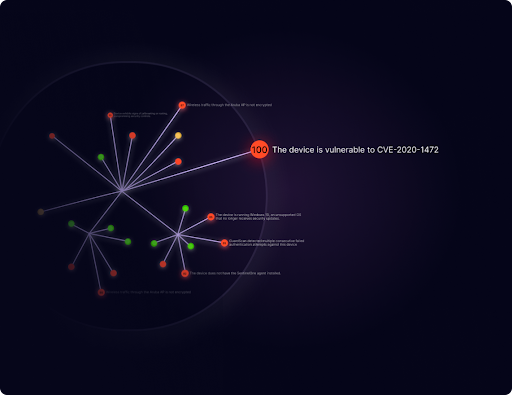
Guardian Exposure Map 2.0 (GEM) is a free security assessment tool that helps organizations quickly visualize connected systems, identify software across their environment, and uncover potentially exploitable vulnerabilities.

Install GEM on a single device to gain a near-real-time view of connected assets, network activity, installed software, and how systems interact. In just minutes, GEM identifies devices, analyzes traffic, audits software, and highlights active CVEs that may be exploitable within your environment.

Guardian Exposure Map 2.0 helps you:

  • Discover connected assets and uncover hidden or unauthorized devices.
  • Audit installed software across your environment.
  • Identify potential Shadow IT, including software that may be unknown, unauthorized, or unmanaged.
  • Surface active CVEs affecting software and systems in your environment.
  • Prioritize exploitable vulnerabilities that may present an immediate path to compromise.
  • Verify device and software inventories against what is actually present.
  • Reduce risk with continuous insight into network activity and exposure.
  • Gain broad visibility across Windows, macOS, Linux, and mobile platforms.
  • Deploy quickly using a lightweight tool installed on a single device.

See what is connected. Discover what is running. Understand what is exploitable.

Create your account and access this free tool to map your risks today!

How It Works

Guardian Exposure Map 2.0 (GEM) identifies assets, analyses network traffic, and highlights potential risks associated with network devices.
Help your team quickly identify vulnerabilities in your network.

Step 1: Identify Devices

GEM analyzes your network to identify active devices, then probes open ports to determine services, versions, and OS details.

Step 2: Understand Network Topology

GEM uses traceroute techniques to map routing paths, measure response timing patterns, and analyze TTL values to infer network hops and device placement.

Step 3: Highlight Risks

GEM analyzes network and device data including configurations, vulnerabilities, and topology to identify security risks, ranking them by severity and potential impact.

Benefits

See what’s connected, understand the risk, and take action before issues become incidents.

Verify Devices

Verify device inventories, uncover unknown devices, and report device status.

Detect Vulnerabilities

Uncover vulnerabilities such as open ports and out of date operating systems.

Reduce Risk

Leverage device and network information to take actions that will reduce risk.
Create your account and access this free tool to map your risks today!

Guardian Exposure Map is a free tool that instantly helps you visualize hidden and potential risks. Built for organizations of all sizes, simply install the map on a single device and get a real-time view of every connected system, how they interact, and how you might be exposed.

Get the Free Tool